CPU-Z Portable v2.17 Latest Version Free Download
v2.17CPU-Z Portable v2.17 is the best software to shows your computer’s hardware details in a very easy way. You can see information about your CPU RAM motherboard.
CPU-Z Portable v2.17 Download - Freewarelab
CPU-Z Portable v2.17 is the best software to shows your computer’s hardware details in a very easy way. You can see information about your CPU RAM motherboard.
CPU-Z Portable v2.17 Latest Version Free Download Video Overview
Watch this video to learn more about CPU-Z Portable v2.17 Latest Version Free Download features and how to use it.
CPU-Z Portable
CPU-Z Portable v2.17 is the best software to shows your computer’s hardware details in a very easy way. You can see information about your CPU RAM motherboard and graphics card without installing anything. CPU-Z runs directly from a USB drive or any folder so you can use it on different computers. The program is fast lightweight simple to use making it perfect for beginners who want to quickly check system information without changing any system settings.
What is CPU-Z Portable?
CPU Z Portable is the portable version of the popular CPU Z software. It shows detailed information about your processor RAM motherboard graphics card. Because it is portable it does not need setup does not change any system files.
Key Features of CPU-Z Portable
- Shows CPU name speed cores and cache
- Displays RAM type size and frequency
- Provides motherboard and chipset details
- Shows graphics card information
- No installation required
- Can run from USB or external storage
- Fast and lightweight performance
Benefits of Using CPU-Z Portable
CPU Z Portable is very useful for checking hardware on different computers. You can carry it on a USB drive use it anywhere. CPU Z is safe to use because it does not modify system settings. The simple interface makes it easy beginners professionals.
Who Should Use CPU-Z Portable?
CPU Z Portable is ideal for students technicians gamers and normal PC users. It is useful for troubleshooting checking system specs or verifying hardware before upgrades.
How CPU-Z Portable Works?
- CPU Z Portable runs without installation
- It scans your computer hardware automatically
- The software reads system information safely
- It detects CPU RAM motherboard and graphics
- All data is shown in simple tabs
- It does not change system files
- You can run it from a USB or folder
- It closes without leaving any traces
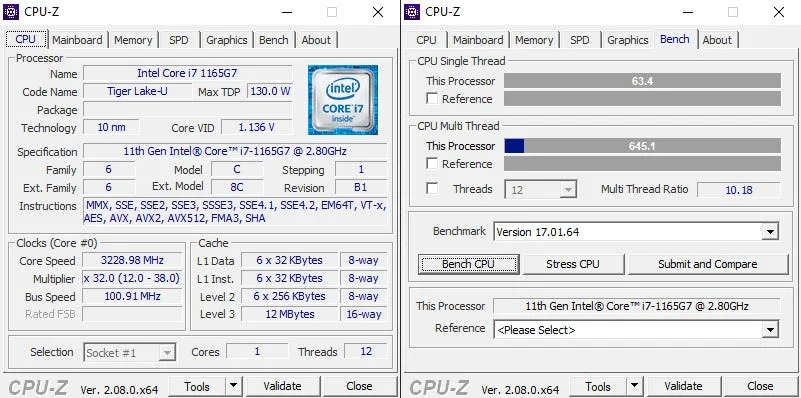
Check CPU RAM and Motherboard Details
CPU Z Portable can see your processor details RAM type and size and motherboard information in one place. Everything is clearly displayed and easy to understand.
Run CPU-Z Anywhere Using USB
You can save CPU Z Portable on a USB drive and run it on any PC. This is helpful for technicians and users who check multiple computers.
Fast and Accurate System Specs Viewer
CPU Z Portable provides accurate hardware information very quickly. It is trusted by many users for checking system specifications.
Best CPU-Z Portable Alternatives
- HWMonitor Portable – Checks temperature voltage and system health.
- HWiNFO Portable – Advanced hardware details with deep system info.
- Speccy Portable – Easy to read PC specs for beginners.
- AIDA64 Extreme – Detailed hardware analysis benchmarking.
- GPU-Z Portable – Best tool graphics card information only.
Final Thoughts
CPU Z Portable is a simple reliable and powerful tool for checking system hardware details. Its portable design fast performance and easy interface make it a great choice for anyone who needs quick PC information without installation.
How to Download and Use for CPU-Z Portable
- First visit the CPU-Z Portable website and click the download button.
- After downloading please find the file in your downloads folder and double click to open it.
- Choose where you want CPU-Z Portable installed or use the default option.
- Click Install to finish setting up the CPU-Z Portable.
- CPU-Z Portable open the program and you can begin updating your drivers.
- CPU-Z will start without installation.
Pros & Cons for CPU-Z Portable
No installation required
Runs from USB or any folder
Lightweight and fast
Shows accurate hardware details
Easy to use for beginners
Does not change system settings
Windows only
No hardware monitoring graphs
Cannot control or modify hardware
Basic design, no modern UI
System Requirements for CPU-Z Portable
FAQs for CPU-Z Portable
1What is CPU-Z Portable used for?
2Does CPU-Z Portable need installation?
3Can I run CPU-Z Portable from a USB drive?
4Q4: Is CPU-Z Portable safe to use?
5Does CPU-Z Portable work on all Windows versions?
Product Information
CPU-Z Portable v2.17 Latest Version Free Download v2.17
CPUID
Freeware
10
Portable

Write a Review
for CPU-Z Portable v2.17 Latest Version Free Download